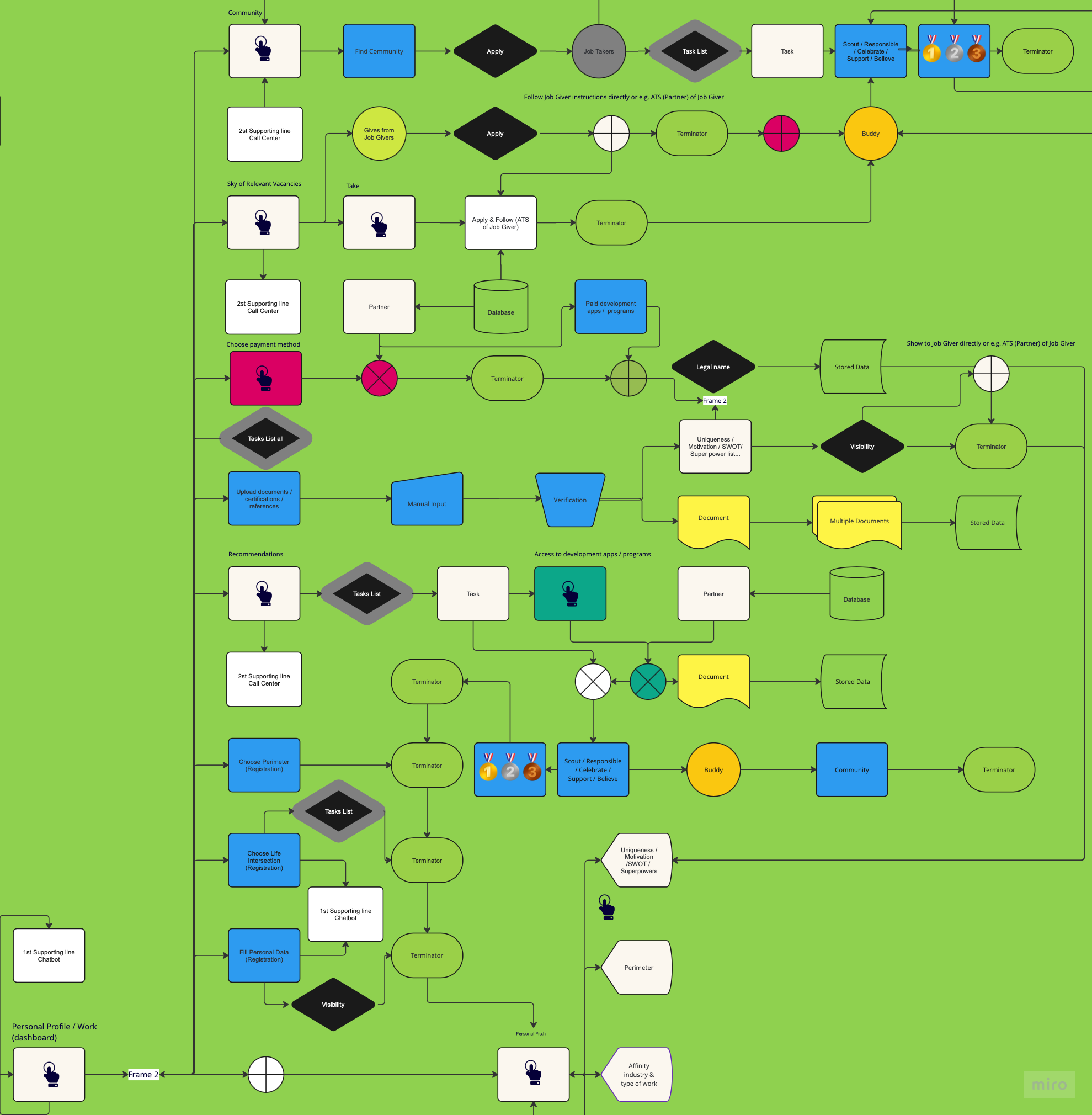
| Filling in personal information on the dashboard (Fill Personal Data) involves selecting the predefined fields in the structure: email, phone number, name/nickname, photo/avatar, gender, age/birthday, country/city living in, year of arrival. |
After a successful onboarding/Frame 2. Maybe supported by a (Chatbot). Only name or nickname is a must. Legal personal data will be verified later, e.g. by selecting a payment method (Choose Payment method) in Phase 3 (Job Ready). |
HIGH |
|
|
|
| The decision to make data visible (Visibility). |
Except for the name or nickname, all the filled-in data are optional. Even if they are filled in, they may be made non-visible at the user’s discretion to preserve safe anonymity. If they are shown before they are verified, they will be labeled as unverified. Email addresses and telephone contacts should only be accessible to P.W. and Buddy. |
|
|
|
|
| Job Takers should consider their key life aspects displayed on the dashboard. This process involves the precise selection of predefined fields (Life intersection needs), including health, security, transportation, family, food, and housing. |
Maybe supported by a (Chatbot). Life intersections will be clearly outlined in the Personal Pitch for Job Givers. The solutions to these needs will be managed and tracked on the (Task List) under the supervision of a Buddy. |
|
|
Each life intersection need is processed into instructions and milestones for Job Takers, and also into supporting Buddy procedures so that their fulfillment is feasible, manageable, controllable, measurable, assessable, and can be improved. |
|
| From the main (Task List all) page, Job Taker can: - View the list of actions present in the system. ..Recommendations, Life Intersection Needs, Community, Own Action. - Apply filters to narrow down the list of actions. - Search for actions in the list by entering search strings in the Search field. ... - Create a new Own Action. - View an action. |
Job Takers can manage and track their Tasks, monitor their progress, and implementation, and plan the next steps. They can also celebrate the results achieved and, under Buddy's supervision, share them with the Community and with Job Givers. |
|
|
|
|
| The Job Takers can define the (Perimeter) of their job application on the map and prioritize preferred destinations. |
Preferred destinations will be linked to their motivation letter. The Perimeter of the job application is visible in the Personal Pitch for both Job Givers and Buddies. |
|
|
|
|
| (Recommendations) are based on self-assessment results found in personality development. Job Takers can easily identify areas for personal development by clicking on the self-assessment results. They can see a (Task list) including their current level of developing skills (abilities), the recommended level, and the highest possible attainable level. |
Recommendations guide Job takers to self-awareness, increasing their confidence in their abilities. They create the prerequisites for a positive routine of disciplined active learning and obtaining structured feedback. They encourage Job Takers to spend meaningful time using P.W services. Maybe supported by (Call Center). |
|
|
|
|
| By choosing their specific recommendation on the Task List, the Job Taker gains (Access to development apps & programs). |
By opening the specific development application and the recommended educational program, the Job Taker will gain access to their personal development, possible certification, obtaining authorization, or the required qualification. The access will allow them to pause, resume, replay, or continue the program. Usually, the educational program is split into unpaid and paid. The Job Taker, at their discretion, completes a program recommended by the P.W. and can also select a paid program. Recommended programs have preferential support from P.W., and their completion will be rewarded and celebrated in the Community. Graduated programs usually end with a test. The results of the tests will affect the assessment of progress in the recommended development areas and will be visible on the Personal Pitch in (Development / Reputation Ranges). Official documentation confirming the successful completion of education with a legal name will be (after Visibility decision) available to Job Givers via Personal Pitch. |
|
|
|
|
| On (Sky of relevant Vacancies), they see all working positions that match their expectations / preferences and the Assessment results. |
Information about each job position consists of: job description place of employment financial and non-financial benefits legal form of employment score of suitability/difficulty of application all requirements for Job Taker link to recommendations and how to fulfill them Company Pitch with IKIGAI assessment of Job Giver and their rating. Job Taker specially sees direct (Gives from Job Givers). Job Taker maybe supported by Call Center. |
|
|
|
|
| The Job Taker can send a (Take) to the selected Vacancy/ies at their discretion. |
Each Vacancy has a button to contact the Job Giver directly. |
|
|
|
|
| The Job Taker receives instructions on how to proceed in the selection process (Apply & Follow). |
The Job Taker receives instructions directly from the Job Giver or an intermediary, such as an Applicant Tracking System or recruiting firm (Partner). |
|
|
|
|
| List of (Gives) that are directly from Job Givers. |
Can be extended by personalized messages. The Job Taker can review their applications (Apply) and proceed according to the provided instructions. Buddy can accompany the Job Taker personally or virtually, according to the Job Giver's needs and instructions. Buddy shares a success story with the Job Taker's Community and, even after a successful placement, makes an intermediary in the community e.g. if the Job Taker decides to continue using P.W. for lifelong learning and personal development. |
|
|
|
|
| A Job Taker can find/log in to a (Community) of other Job Takers. Community is a moderated communication platform for Job Takers. Buddy confirm Job Taker's acceptance into a Community. |
Job-takers are encouraged to interact with others. Job Taker can share links and docs in verified safe formats. Shares successes, best practices, and unique skills. Job Takers can join the ongoing discussion, explore new topics, present their interests, offer/ask for help, post personal alerts, and celebrate the achievement of development milestones. Tasks are created in the community and collected in a (Task List). |
|
|
The mutual interaction of Job Takers rests in a meaningful group discussion on planned common topics, which should confirm the learned and theoretically acquired knowledge from educational programs and translate them into feasible, manageable, controllable, measurable, assessable practical activity in the community and for the community. The achieved results will enhance their resilience and maturity, which is reflected in their developmental score. |
|
| The (Upload documents & Superpowers) button enables the Job Taker to upload, update, and manage personal documentation such as employment documents, employee references, ID cards, payment cards, certifications, permits, photos, and confirmations at their discretion. They can create bookmarks, and sort documents in categories: verified, unverified, final, new, old, deleted. |
Job Taker can digestedly collect all transferred documents in one place. |
|
|
|
|
| Insertion (Manual input) of documents in the usual formats is done by simply dragging the document into the document reading area. |
Transferred documents are exclusively viewable within the dashboard to accommodate the backup requirements of the Job Taker. |
|
|
|
|
| If the Job Taker decides to make a specific document verified, they can do so only by legalizing the name (Legal name). |
Only verified documents can be made visible (Visibility) by the Job Taker on the Personal Pitch in the section (Uniqueness/Motivation/SWOT/Superpowers List...). |
|
|
|
|