Job Giver Showroom
| Area | Job giver |
|---|---|
| Epic | Type /Jira to add Jira epics and issues |
| Document status | DRAFT |
| Document owner | Andrej Drinovsky |
🎯 Objective
Enable Job Giver to creatively present all the attractive elements of their company in one place.
Success metrics
| Goal | Metric |
|---|---|
| Provide an inspiring, effective, and user-friendly space for Job Giver to creatively communicate their attractiveness (opportunities, offerings, benefits, advantages) to potential Job Takers. Visible on Company Pitch. | - The number of actively interested Job Takers. - The percentage of actively interested Job Takers who have also visited the Showroom. |
Assumptions
The key user for this feature is Job Giver’s employee who acts as an Admin for the PW platform. Often, this will be a Recruitment Professional who is used to the existing ways of their company’s employer branding. Therefore, the design of the Company Showroom feature should inspire such users to be more creative and differentiate their company’s proposition in a new way. This should be done mainly by offering ready-made elements and recommendations from P.W. or Partners that can be customized (templates, widgets, APIs, etc.).
Requirements
| Requirement | User Story | Importance | Jira Issue | Notes |
|---|---|---|---|---|
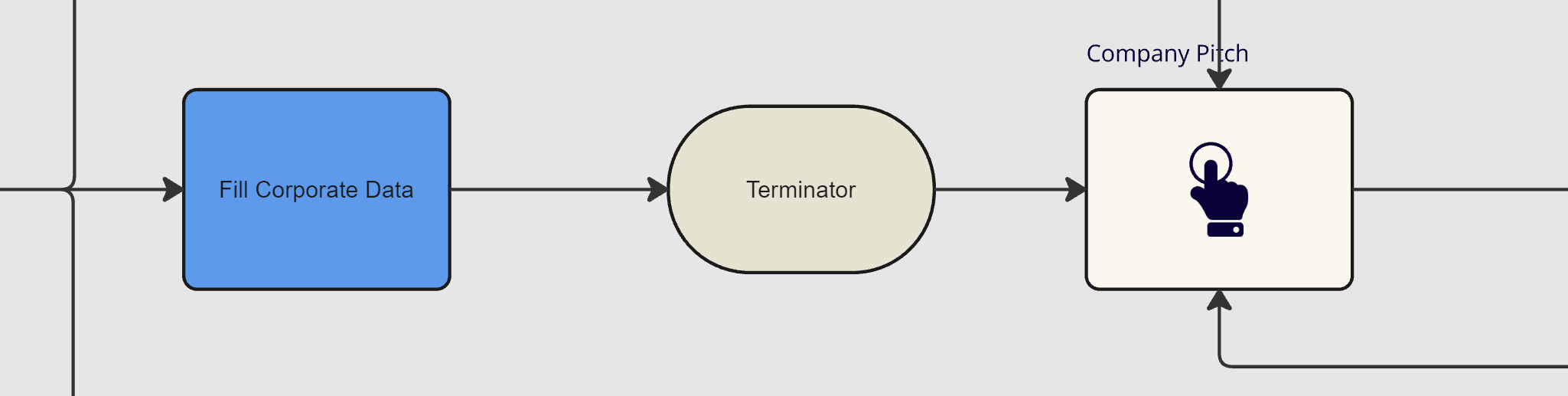
| Company Showroom is one of the top items on Job Giver’s home (landing) screen. | As Job Giver, after login, I will see my home screen where I can easily locate the button that enables me to view and edit my Company Showroom | |||
| Company Showroom is a creative space that can be compared to a shopping window targeted at Job Takers. As such, its format, content, and key messages must be heavily customizable in a user-friendly way. | As Job Giver, I want to attract the right kind of Job Takers by designing a unique and authentic Company Showroom that feels immediately compelling to the right target group of candidates. | In the future, consider offering 3 ways to design the Company Showroom: 1. Off-the-shelf content design elements and templates 2. AI-driven suggestions based on the company’s profile data 3. Blank canvas option (content subject to approval) This document only covers the first option. | ||
| Upon accessing the Showroom for the first time, Job Giver is greeted with a video (or animation) demonstration of what is possible. | As a Job Giver, when entering the Showroom feature for the first time, I’m blown away by all the cool, creative stuff that’s possible and that I can readily adopt for my company. | |||
| The showroom is built using a “showroom designer” interface that offers ready-made Content Design Elements (CDE) that can be used and customized by the Job Giver in a simple, drag-and-drop fashion. | As a Job Giver, when designing my Showroom, I can quickly locate various Content Design Elements (CDE) sorted by categories and then experiment with combining them to create a unique design that perfectly expresses my company's key employee branding message. | |||
| Job Giver’s Showroom tracks each unique visitor’s activity and awards them “experience points” (XP) | XPs are awarded for both exploration of various Showroom content as well as achievement in games, quizzes, etc. Earned XPs can then be used to purchase company merch and also give an advantage to the Potential Candidate when applying for a vacancy with the specific Job Giver. | |||
| CDE 01: Video testimonials - formal | Short video testimonials from selected employees. | All video CDEs also contain some good examples and effective prompting questions. Production can optionally be outsourced to one of PW partners. | ||
| CDE 02: Video testimonials - story | Medium-length video testimonials reflecting on employees' stories about their applying, joining, and working for the company | |||
| CDE 03: Video testimonials - life | Medium-length video testimonials about different life backgrounds of employees and managers (life story, hobbies, diversity, migration, values, plans & dreams…) | |||
| CDE 04: Video testimonials - customer impact story | Medium-length video testimonials by customers about a specific positive impact of the company’s products or services. | |||
| CDE 05: Live stream | Live stream cams that allow potential candidates to watch different company premises in real time | |||
| CDE 06: Live chat with employees | An opportunity to chat with real employees from a candidate’s area of interest. This also includes questions (business-related advice requests) posted by the employees that a Potential Candidate can respond to in a chat and earn XPs if their advice was considered helpful (similar to Quora) | |||
| CDE 07: CEO’s fireplace | Either pre-recorded or regularly conducted live online events where the company’s CEO talks about their life story, values, and vision for the business. | |||
| CDE 08: AI image impersonator | A potential candidate can upload their photo and then download a selection of funny images/posters featuring themselves in the company’s outfit, gear, workplace, canteen.. | |||
| CDE 09: The challenger ring | A debate-like online space where a potential candidate can challenge (argue against) the company’s existing principles, priorities, values, strategies, job requirements, processes… This must be done seriously - using facts, cases, scenarios. The higher the rating of the argument awarded by the Job Giver, the higher the level of manager who will respond and argue in defense of the Job Giver and also the higher the amount of earned XPs. | This serves two purposes: - As a potential candidate, I can test my doubts about some aspects of the company - As the Job Giver, I can get valuable external perspective, improvement ideas, and flag interesting candidates | ||
| CDE 10: VR event participation | Potential Candidate can take part in some of the previous events of the company using VR headset, feeling the atmosphere and the culture first-hand | |||
| CDE 11: Interactive statistics | Stats, charts, and graphs about various aspects of the company that a Potential Candidate can drill into. These include things like employee structure, fluctuation rate, diversity, promotion rate, average tenure rate, average salary increase rates, financial data, and performance KPIs - across different parts of the company | |||
| CDE 12: Inside View - global corporate locations | Just like Google Maps StreetView functionality but inside the company’s various premises | See Google London HQ for example (switch on StreetView): https://maps.app.goo.gl/cnCB7xdM4mFEVFHj8 | ||
| CDE 13: Best campaigns gallery | A gallery of recent marketing and social media campaigns that received the highest attention. | Ideally with regard to employee brand but also product campaigns will do. | ||
| CDE 14: Banner (slogans, values..) | Static or animated imagery that communicates important messages about the Job Giver. | PW Partner will offer services like e.g. animating existing static marketing images | ||
| CDE 15: An AI guide that will answer any questions about the company in a real-time voice role-play style. | Have questions, doubts, about the company and its offerings? Ask your trusted AI insider. No questions barred! | All AI-driven voice chats are hosted by PW Partner through an API | ||
| CDE 16: Similar people finder | Wondering if people like you get ever hired by this company? Enter key elements of your background and if a similar employee is found, you can ask them questions. | |||
| CDE 17: Cabinet of Awards | A virtual cabinet with company’s awards and trophies that one can explore. | |||
| CDE 18: Sitcom | A series of mini sitcoms featuring employees and managers as actors. It provides a funny and engaging take on the company’s culture. | PW Partners will provide authoring and production services | ||
| CDE 19: Virtual product showroom | A virtual room showcasing all the products and services the Job Giver is proud of. | |||
| CDE 20: Merch store | Creative merch that embodies company values. Job Takers can also redeem their XPs here. | PW Partners will design and produce the merch | ||
| CDE 21: Community projects | Stories, pictures, videos, testimonials about Job Giver’s community, social, environmental, culture engagements | |||
| CDE 22: Selection process preview | Job Giver’s Recruitment Specialist walks the Potential Candidate through the typical selection process including some interesting backstage insights and tips | |||
| CDE 23: Alumni profiles | Picture storyboards of interesting career stories of some of the former employees (filterable by job area) | |||
| CDE 24: Interactive game | A small video game where a Potential Candidate can attempt to achieve a high score and win a prize while learning important aspects of the company’s business and culture | |||
| CDE 25: A quiz about the company with a prize to win | Once the Potential Candidate has visited all Showroom sections, they can test their knowledge in a quiz and win a prize. The quiz room is animated, complete with a cheering audience and the CEO as a quiz master. | |||
| CDE 26: Ask chauffeur/receptionist | Since chauffeurs and receptionists have the best overview about everything, Potential Candidates can voice-chat with them (trained AI avatars set in the car / at the reception desk) | |||
| CDE 27: Sponsorships | A virtual pinboard with logos, pictures, and amounts given for good causes in the last 12 months. | |||
| CDE 28: Rumor and BS detector | A True/False chatbot that will fact-check any rumor or claim the Potential Candidate has heard about the company. Including the claims found in the Showroom! | |||
| CDE 29: Crash course in…. | Short, complimentary online training courses that relate to skills or behaviors the Job Giver values. | Provided by PW Partner or through access to the Company’s LMS | ||
| CDE 30: Everyday learning opportunities | An overview of different learning offerings and initiatives that employees can enjoy. | This can be done in the form of flip cards arranged according to job areas and seniority and upon clicking flip and show details like content, photos, and testimonials. | ||
| CDE 31: Canteen menu with delivery | Current week’s canteen menu. Job Taker can use XP points to order canteen food delivery if located in the broader area. | PW partner arranges the delivery. | ||
| CDE 32: Performance Evaluation and Career Preview | This Talent Management blog explains how individual and team goals are set, what is being evaluated how often, and what it takes to be considered for a promotion. It also includes a chart showing the most common career paths with the average time between career steps. | |||
| CDE 33: Job market with AI career coach | The collection of current job postings of Job Giver sorted by the degree of the match with Job Taker’s profile. The voice AI assistant is there to help explain different role types and find the most attractive kind of work for the Job Taker. | |||
| CDE 34: Benefits-and-perks comics | Overview of employee benefits presented as a “week in the life of an employee” comics story. | |||
| CDE 35: Recommended certification courses | Links to online courses that are accepted as proof of qualification. Sorted by role types and work areas. | |||
| Company Showroom can be easily linked to Partner content (API?) so that Job Giver doesn’t need to develop their own learning, certification, video-promotion, or skill assessment solutions. Instead, they can use PW-approved reliable Partners or recommend their own supplier to register as a PW Partner. | As Company admin, I can browse a library of reliable PW Partner solutions that I can use on my Company Showroom for potential Job Takers to use. These can include recommended certification training, language training, etc. that my Company will accept as proof of qualification. Further, they can include other services like video production/hosting to enrich the Company Showroom experience. | |||
User interaction and design
Open Questions
| Question | Answer | Date Answered |
|---|---|---|
| Could we merge Company Data and Showroom into one? This might be more simple and avoid potential navigation confusion. I assumed this in the requirements above while separating the data only Company Admin can see. | Company data is managed through the Job Giver Dashboard. Only the information that is filled out and permitted in the Dashboard will be displayed in the Showroom, ensuring there is no navigational confusion. The Job Giver Showroom and the Job Taker Matrix are technologically identical "Construct". |
⚠️ Out of Scope
-